G-SEED green building certification

Bringing the steps and information of a certification process into a coherent workflow.

Conceptual illustration of green building certification software

Background

G-SEED is Korea's national green building certification scheme, in the same family as LEED or BREEAM. A building is assessed on its environmental performance and given a grade. Getting there means an applicant requests a quotation and files documents, a certifying body receives them, reviews them and inspects the site, a committee decides, and a certificate and a physical plaque are issued at the end. Each of those steps is handled by a different party on a different screen, so the applicant — the one person who cares about the whole case — is usually the one who cannot see it. This prototype puts the entire sequence into a single progress flow. This internal prototype was developed at my employer, the Korea Institute of Green Climate Technology, without live certification, payment or delivery connections. Its placement as the certifying body on screen is a fictional setting for the demonstration.

Role
Project Manager / Service Designer
Team
Worked with frontend and backend engineers
Organisation
Korea Institute of Green Climate Technology
Timeline
April–July 2026 · 4 months
Tools
Figma · AI-Figma MCP · Browser prototype on local storage

Outcomes

  • Eight progress stages with three roles working against one shared data store
  • An unbroken chain of state transitions from quotation through to certificate issuance
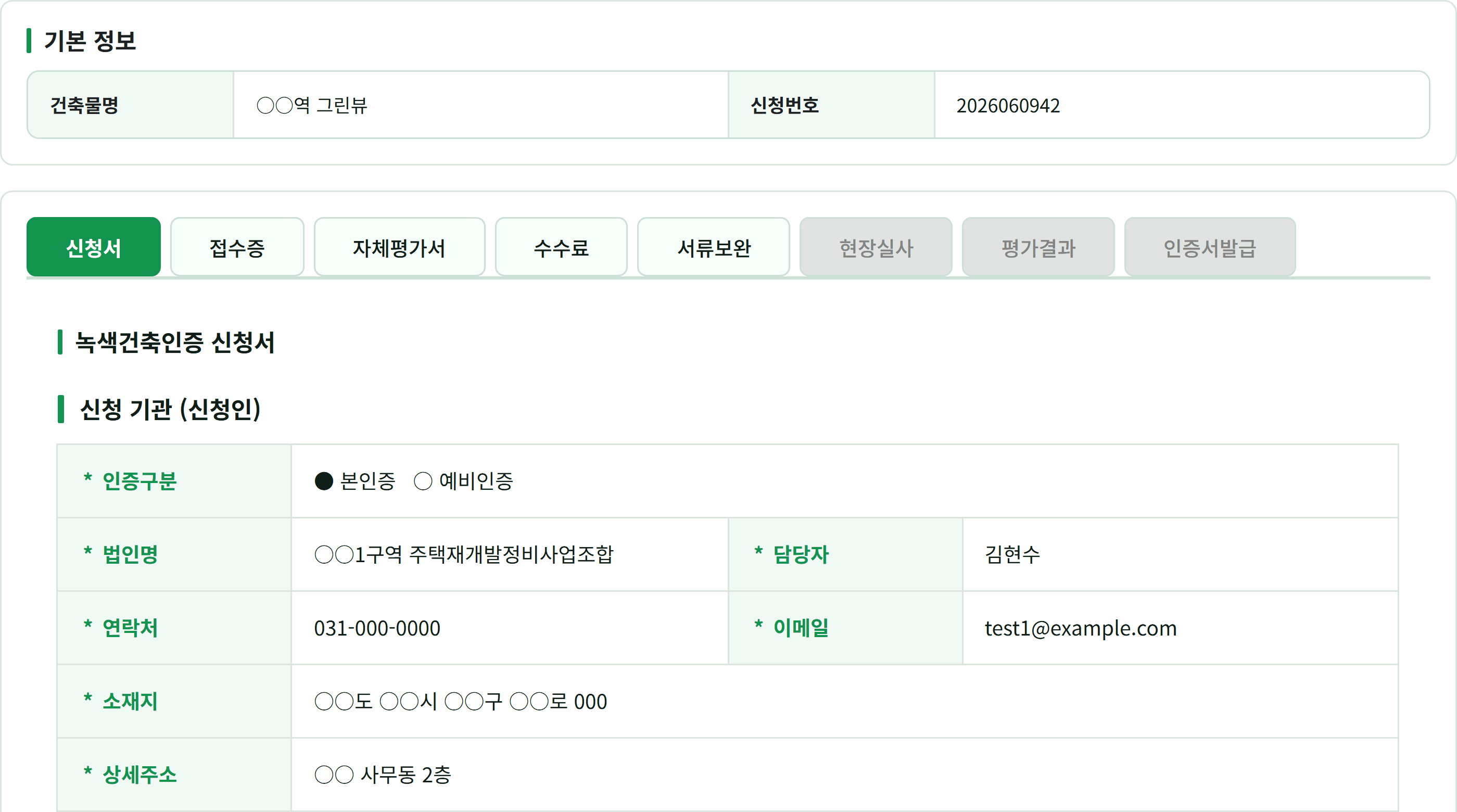
The G-SEED progress detail screen, with five of the eight stage tabs active and site inspection, evaluation result and certificate issuance greyed out.
A stage opens only once its own data exists. The certifying body shown is a demo setting used to reproduce the screens, and the applicant details were replaced with stand-ins before capture.

The problem

In certification work, the owner of the information changes at every step. The applicant writes the application. The certifying body issues the acknowledgement of receipt. The evaluation result is settled by a committee. Each party can see its own part on its own screen, and the work does get done — but nowhere is there a view that follows one case from beginning to end.

For the applicant this is the frustrating part. After filing, nothing on screen says what is being waited on or what they should do next. For the certifying body it means that assembling the history of a single case requires checking several places.

How I approached it

I connected the applicant and agency views around a single certification case. Defining who supplies and checks each piece of information kept the application and its progress connected as responsibility changed hands.

I defined the information required at each stage and when it should become available. Showing both the sequence and its entry conditions helped an applicant read the current situation and understand what they were waiting for.

Returning to correct documents and cancelling an application were part of the overall flow. Connecting these changes to status and history made the forward and returning paths available for review on the same basis.

The certifying body's own application-detail screen, with "Application" selected among ten stage tabs and the applicant's corporate name, contact and email listed as a table.
The very information the applicant's own screen showed now appears on the certifying body's screen too — evidence that all three roles read from one shared data store.

Certification runs through eight stages. Each stage opens only once the previous stage's data exists, and the document-correction stage sends the flow back to self-assessment.

  1. 01Application
  2. 02ReceiptOpens only when data exists
  3. 03Self-assessment
  4. 04Fee
  5. 05Document correction
  6. 06Site inspection
  7. 07Evaluation result
  8. 08Certificate issuance
Returns to an earlier stage
This sequencing, gating and backward-correction structure — invisible in any single screenshot — is the design decision this flow makes visible.
The lower part of the quotation form, where a notice line gives way to an estimated fee with its basis, and a Save Draft and Request Quotation button sit to the right.
The chain starts at this quotation step. Once the fee the engine computed here is confirmed, the case can move on to the application step that follows it.

Every stage after the quotation opens on data that a different party leaves behind. The screens below follow that data forward: the applicant's own assessment, the certifying body's request for corrections, the committee's result, and the certificate that closes the case.

The self-assessment tab, headed by a submitted status and date, with two entry modes above a table listing each criterion in the land-use and transport field with its point allocation, the score entered and the applicant's stated basis.
This stage's data is created by the applicant. Each criterion is scored within its allocation and given a basis before the case can move on, and the certifying body's review and correction requests work from this same table.
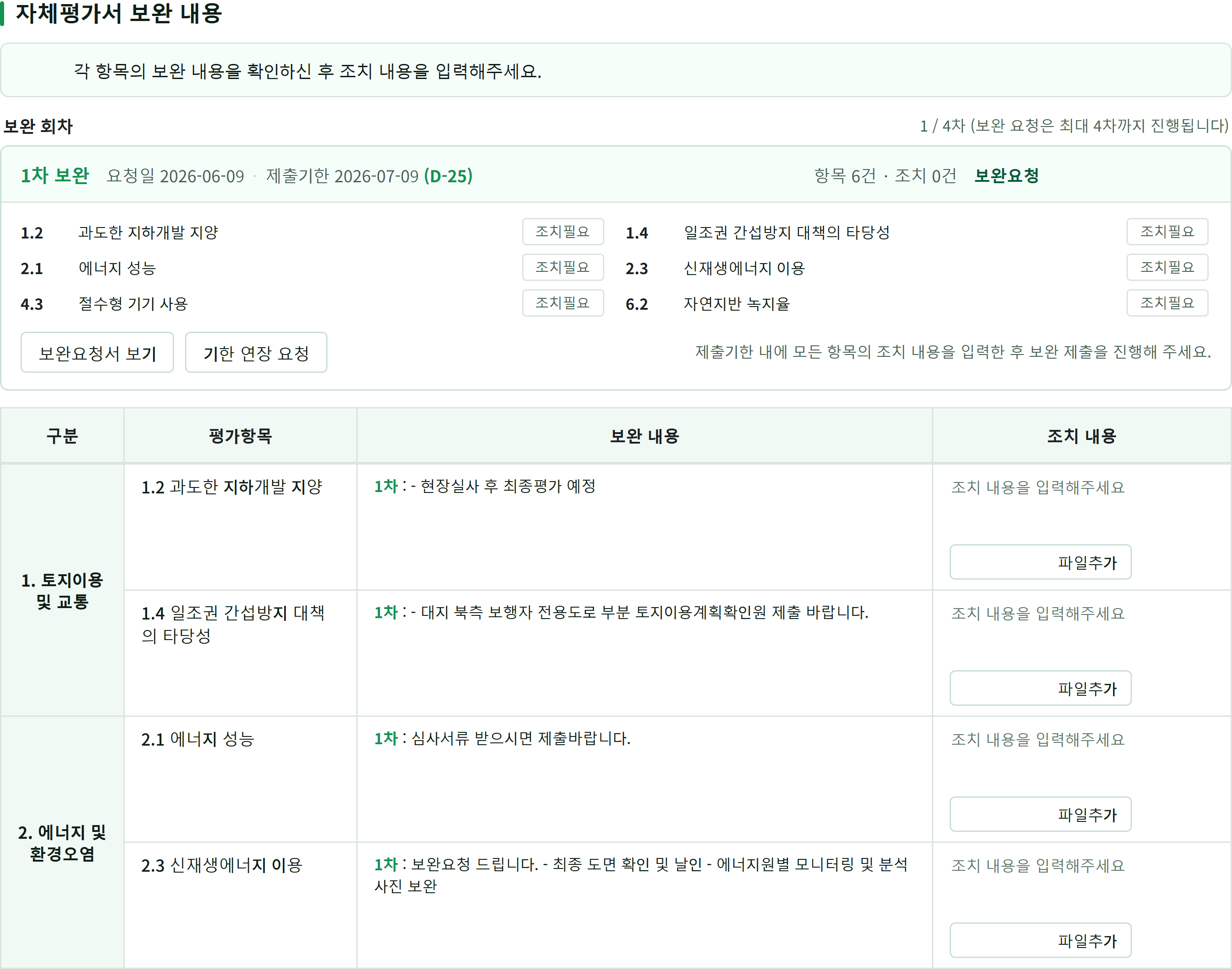
The document-correction tab. A collapsible header for the first correction round shows the request and due dates and its status; below it a four-column table pairs the certifying body's request text for each criterion with an empty response field.
A design that only handles the forward path has no such screen. When the certifying body asks for corrections criterion by criterion, the same case returns to self-assessment, and requests and responses accumulate round by round in one table — so the backward path is reviewed on the same basis as the forward one.
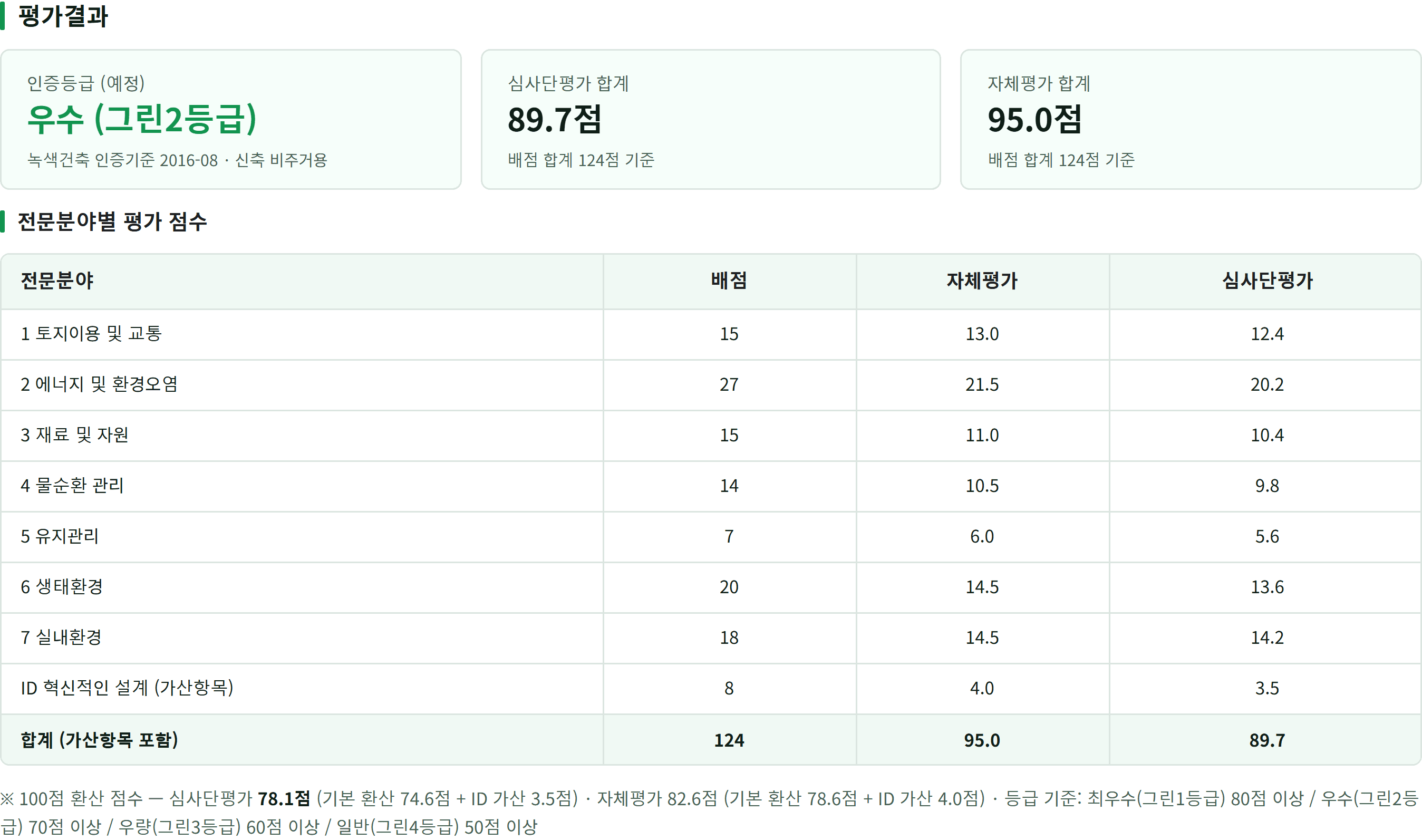
The evaluation-result tab: three summary cards for the grade, the committee total and the self-assessment total, above a per-field table with allocation, self-assessment and committee columns, a totals row and a footnote with the conversion and grade thresholds.
The committee's scores sit field by field beside the applicant's own, and the grade is read from the committee column. The data the applicant created earlier has carried through to this point as the same case.
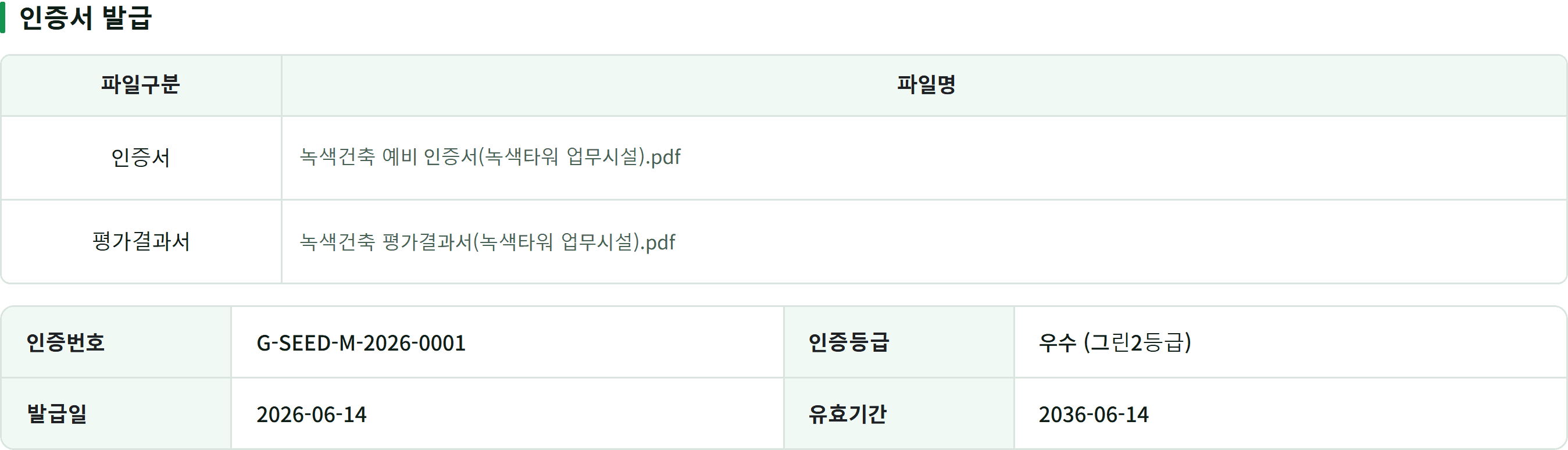
The top of the certificate tab: a two-row table listing the certificate and evaluation-report files, and beneath it the certificate number, grade, issue date and validity period.
The chain that began at the quotation ends here. A certificate with its own number and validity period is issued as the final stage of the same case, so the applicant can follow the file from the first screen to the last.

The outcome

Where a case stands, and what it is waiting on next, now reads off a single screen. The conversation moved up a level, from whether an individual screen is right to whether a state transition is right.

Connecting role-specific screens into one certification flow

Process

  1. Connect roles around one application

    I connected the applicant and agency views around a single certification case. Defining who supplies and checks each piece of information kept the application and its progress connected as responsibility changed hands.

  2. Make the conditions for the next action visible

    I defined the information required at each stage and when it should become available. Showing both the sequence and its entry conditions helped an applicant read the current situation and understand what they were waiting for.

  3. Include correction and cancellation in the journey

    Returning to correct documents and cancelling an application were part of the overall flow. Connecting these changes to status and history made the forward and returning paths available for review on the same basis.

Result

One shared case now shows its current stage and what it is waiting for. Review moved from the appearance of individual screens to whether information and state transitions remain correct across roles.

What I took from this work

Designing the certification experience meant making the connections between stages as clear as the individual screens. Showing where an application stood and whose action it needed next made the whole journey available for review. The prototype became a way to examine responsibilities and sequence alongside page composition.

Read the shared design perspective

G-SEED and emissions target management: a shared design approach

The two programs keep their own procedures. Both designs make the sequence visible, define what allows work to move forward, and attach decisions and records to the case they belong to.

G-SEED green building certification

Sequence of work
  1. Application
  2. Receipt
  3. Self-assessment
  4. Fee
  5. Document correction
  6. Site inspection
  7. Evaluation result
  8. Certificate issuance
Conditions for moving forward
Each stage becomes available when its data exists. Document correction returns to self-assessment so the review can continue.
Records that remain
Stage information, attachment metadata and correction records stay with the application, alongside its certification progress.
Read the G-SEED case

Emissions target management

Sequence of work
  1. Selection and distribution
  2. Completion and submission
  3. Receipt, review and correction
  4. Confirmation
  5. Agency sharing
  6. Response and change management
Conditions for moving forward
Receipt, correction and confirmation follow one shared procedure. Only confirmed surveys can enter a file shared with the agency.
Records that remain
Decisions and evidence stay with each survey, with separate records of generating, delivering and acknowledging the shared file.
Read the emissions target management case